Picking an Agent Client After Ten Years in Engineering: Codex, OpenClaw, and AgentiLoop
A2Agent Team · 2026-09-14T00:00:00Z
License update (October 6, 2026): When this post was published on September 14, 2026, AgentiLoop Agent! was MIT-licensed. On September 21, 2026 the project was relicensed, and current versions are under the PolyForm Noncommercial License 1.0.0: source-available, for noncommercial use. Official release binaries remain subject to their own terms. See the project's LICENSE and NOTICE for details. The canonical repository is github.com/AgentiLoop/Agent; older macOS26/Agent links redirect there. We've updated the license mentions below.
I've cycled through a lot of agent clients this year. Not to try the new thing — I was looking for one I could actually settle on.
I've been an engineer for ten years, and these days I work mostly on system-level development on macOS. That work has a particular shape: it needs an agent that can write code and drive the machine. Change the code, build it, run it, click through the GUI to see whether it actually worked, then go dig through logs, check permissions, and touch system config when it didn't. Most agent tools on the market cover one half of that and stop.
Codex: great for newcomers, one layer removed for the rest of us
I still use Codex. Its engineering ability is genuinely strong. But one thing has bothered me the whole time: it buries the code too deep.
I understand the design intent. If you don't write much code, collapsing the intermediate steps and handing back only the result is the smoothest possible experience. For someone ten years in, it's the opposite. I frequently need to stop and look: which line did it actually change? How does that branch resolve? Which version of the file did it read?
It isn't a trust problem. I need to follow its reasoning in order to give a sharper next instruction. When I want to expand and read the actual code, the path to get there is convoluted. The tool is saving me effort, and what it saves is precisely the information I need.
OpenClaw: closer to question-and-answer, and deep call chains break
OpenClaw takes a different route, with a much larger ecosystem and broader reach. But its interaction model is fundamentally question-and-answer: you say something, it does a round, it comes back.
The problem shows up in multi-level tool calls. Once a task needs several layers of nesting — look up a file, decide what to call based on the result, then decide whether to roll back — a long chain gets fragile. What I hit most often with OpenClaw is that it stops returning: the task goes out, the progress indicator moves, and the result never arrives. Kill it and start over.
You can't fix this by switching models, because the fault isn't in the model. It's in the harness — how the task loop is structured, how context gets compacted, how tool results are reclaimed, how it recovers from an error. Those are what decide whether an agent client can carry a long task at all.
Then I found AgentiLoop/Agent
Repo: github.com/AgentiLoop/Agent
I'll be honest: my first reaction was hesitation. Six hundred–odd stars, 977 commits, essentially a one-person project. Against today's pile of AI tools with tens of thousands of stars, it's easy to scroll past.
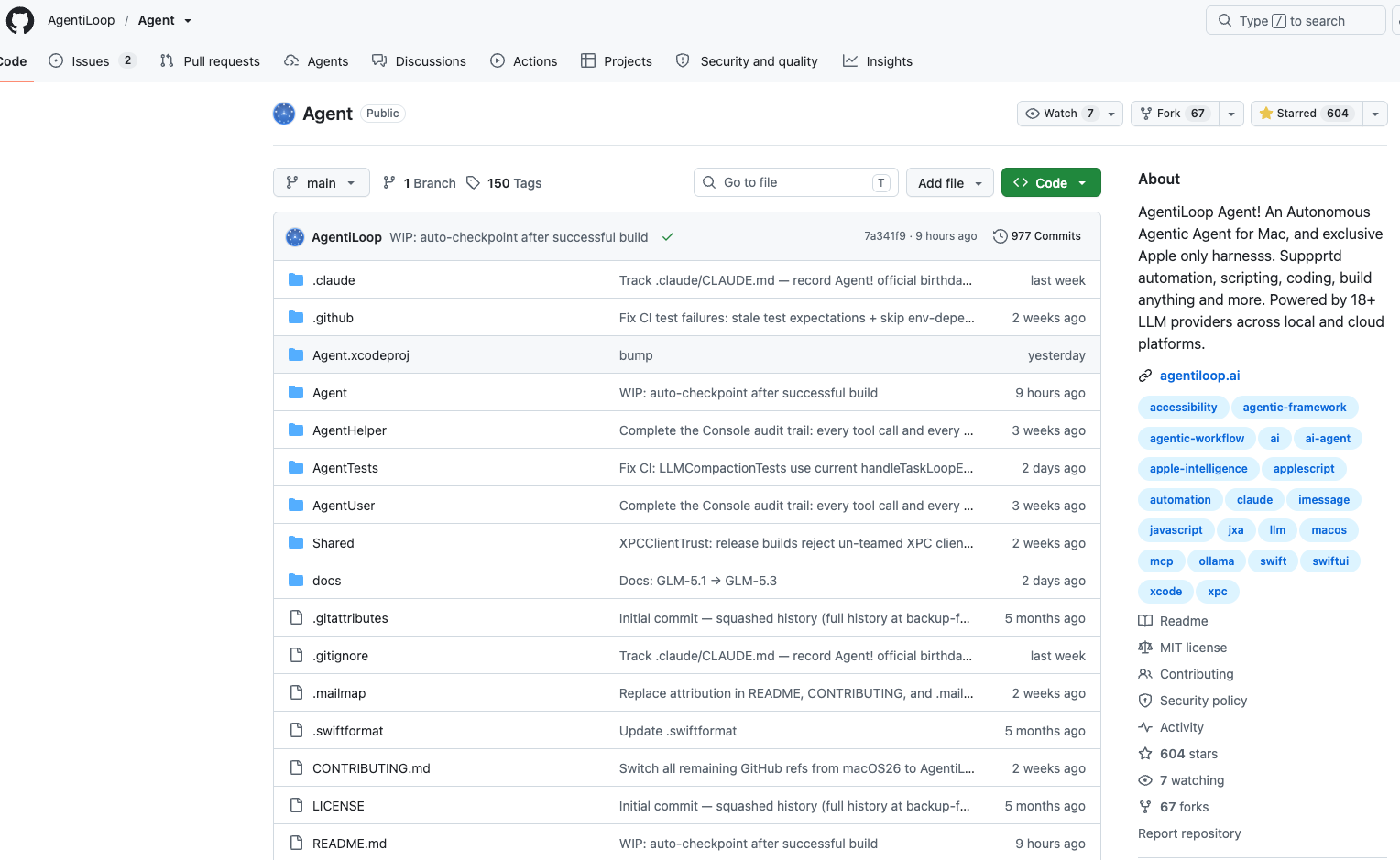
Screenshot taken before the September 21, 2026 relicense, so the sidebar still shows the MIT license. Current versions are under the PolyForm Noncommercial License 1.0.0.
Then I scrolled the commit history and the impression changed. 150 tags, most recent commit nine hours ago — and the commit messages themselves say a lot:
XPCClientTrust: release builds reject un-teamed XPC clien…Complete the Console audit trail: every tool call and every …Fix CI: LLMCompactionTests use current handleTaskLoopE…
This isn't a project with a polished README and code frozen six months ago. XPC caller verification, a complete audit trail, regression tests for context compaction — those are the signs of someone still chewing through the hard parts. The low star count just means it hasn't been noticed yet.
After reading the README end to end, my reaction was: this thing was built for my use case.
It's a 100% native Swift 6.2 / SwiftUI macOS app, source-available under the PolyForm Noncommercial License 1.0.0 (it was MIT when this post first went up), with no NPM, no Electron, no subscription, and no telemetry. The positioning isn't "a coding agent that can also use your computer" — it's "an agent that can drive your entire Mac, and happens to be very good at code."
Here's what it looks like running:
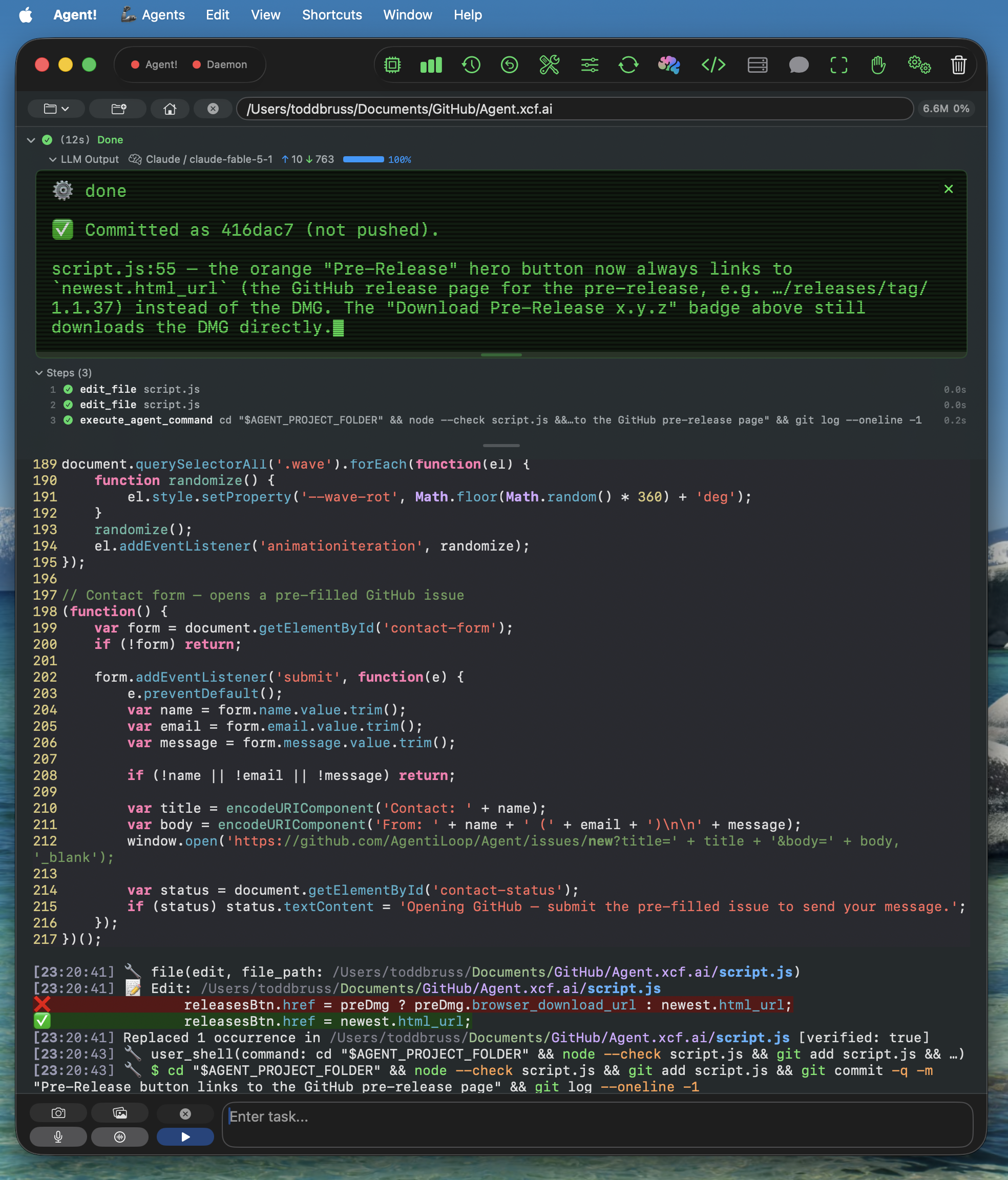
That screenshot largely answers the complaint I opened with. Top to bottom, in a single screen:
- The task result — done in 12 seconds, on Claude, 10 tokens up and 763 down, stated plainly
- Steps (3) — two
edit_filecalls and one shell command, each with its own timing - The code itself — line numbers, syntax highlighting, and I can scroll wherever I want
- The activity log —
file(edit, file_path: …)shows which tool ran against which file, a red and green pair puts the before and after line right there, followed byReplaced 1 occurrence … [verified: true] - At the very bottom, the shell it actually ran:
node --check script.js && git add && git commit
No black-box "I've made the changes for you." What it did, which line it touched, and whether it verified the result are all in the open. That's the information density I want after ten years — I don't need it to save me effort, I need it to stay legible so I can aim the next instruction.
Four things won me over.
1. AgentScript: dlopen the script into the main process to inherit TCC
This is the cleverest piece of design in the project.
macOS TCC permissions (Calendar, Contacts, Mail, Photos, Accessibility) are bound to the process and its code signature. So the conventional approach — spawning a subprocess to run a Python or shell script — means the child doesn't inherit the host app's TCC grants. It either triggers a permission prompt or fails outright. This is exactly why so many agent tools go helpless on a Mac the moment system capabilities are involved.
Agent! does it differently. An AgentScript is a plain Swift file in ~/Documents/AgentScript/agents/Sources/Scripts/. The app compiles each one to a .dylib with SwiftPM, then dlopens it into its own process — reusing the TCC grants Agent! already holds. Package.swift also ships 51 ScriptingBridge app bridges, so import CalendarBridge wires itself up with no build-config changes.
The LLM manages these through the agent_script tool (create / edit / run / delete / restore / pull), and about 35 examples ship with the repo: TodayEvents, NowPlaying, CheckMail, CreateDmg, ArchiveXcode, and more. Deleted scripts go to .Trash and can be restored.
The cost is stated honestly: there is no process isolation. A crashing script takes the whole app down with it, and LLM-generated code runs directly inside a process holding every TCC grant. That's isolation traded for capability. For me the trade is worth it — what I want is an agent that can genuinely operate my machine.
2. Privilege separation: root goes through a broker, and the LLM can't route around it
Most agent tools run straight in your shell. Escalation is your own sudo, with nothing in between. Agent! splits it apart:
- Regular shell runs through a Launch Agent; root shell runs through a Launch Daemon (SMAppService + XPC, approved exactly once)
ShellSafetyServicehard-blocksrm -rf /,rm -rf ~, bare-globrm -rf, and--no-preserve-root— enforced on both the client side and the daemon side, so the LLM can't get around it- Both XPC listeners require same-team code signing, derived from the app's own signature; release builds reject un-teamed clients
That last point deserves emphasis. A lot of people don't realize that installing a helper daemon capable of running as root, without caller verification on its XPC endpoint, is effectively a backdoor into the whole machine — any local process can connect and borrow that root. This attack surface is widely overlooked in comparable projects. Calling it out explicitly in the README means the author actually thought about it.
3. Accessibility API instead of screenshots and coordinates
This is where it diverges fundamentally from the Computer Use approach.
The mainstream method is screenshot, locate visually, click at (x, y). Agent! works against the Accessibility API element tree — element-based, 25 actions, with fuzzy matching and automatic retry. The differences are real:
- An order of magnitude less token spend. A structured text tree versus a full-screen image every single turn
- Far more deterministic. Resolution, dark mode, window position, and theme changes don't affect it
- Combined with NSAppleScript, JXA, and those 51 ScriptingBridge bridges, everything runs in-process, so TCC grants apply directly
The limitation is equally clear: it only works on apps that honestly expose an AX tree. Electron apps and custom-drawn UIs — games, canvas-based tools — are largely out of reach. But for the native Mac apps I work with daily it's more than sufficient, and far more reliable than the screenshot loop.
4. Harness details done more carefully than most implementations I've read
I said OpenClaw's problem lives in the harness layer. The harness layer is exactly where Agent! put in the work, and several details made me nod:
Hallucination correction. When the model claims "I clicked it" or "I searched for that" without having emitted any tool call that turn, the system injects a correction. Every agent makes this mistake; very few explicitly detect it.
A task can't declare itself done. Every criterion in goal_state has to carry evidence before it can be marked complete, and you can optionally enable a critic that reviews the diff before the task closes. Compare that to pure checklist-style todo tooling — checked is checked, and nobody verifies anything.
A read-before-edit gate. edit_file and apply_diff refuse to touch a file the LLM hasn't read during this task, or one whose SHA-256 changed on disk since the last read. The nice part: the refusal reads the file as it refuses, so the next call is the edit and you save a round trip. External file changes get pushed to the model as diff snippets each turn, rather than waiting for it to collide with a conflict.
Context compaction re-attaches state. The threshold is model window minus reserved output minus buffer, computed from the real input_tokens the provider reports rather than a local estimate. Compaction uses a provider-side nine-section LLM summary, and afterward the open goal, the plan checklist, and the list of edited files are re-attached to the context. That addresses the nastiest failure in long tasks — one compaction and the model forgets what it was doing. Oversized tool results are spilled to disk at the moment they're emitted and recovered on demand via restore_tool_result, instead of being stuffed into context and then bluntly truncated. A 413 overflow routes through forced compaction with a shorter retry; a max_tokens overrun escalates first, then continues.
Read-only tools start executing while the response is still streaming. Speculative-execution-style latency shaving, which I haven't seen much of in other harnesses whose source I've read. There's also input-aware shell concurrency and jittered exponential backoff honoring Retry-After on 429/529.
None of these is dramatic on its own. Stacked together, they're the difference between a long task finishing and a long task dying halfway.
Other things worth mentioning
- Xcode integration is native —
build/run/analyze/code_review/bump_version, clickable errors, plus Swift Syntax 6.2 analysis. You can't get this by parsingxcodebuildtext output - Every edit is snapshotted, with one-click rollback or a task-scoped
rewind_task - Sub-agents: up to 3 concurrent (6 read-only), with mailbox-style messaging and a per-agent model override
- Tabs: each tab gets its own project folder and log, plus persistent user memory and multi-plan checklists surfaced in every prompt
- Voice: say "Agent!" followed by your task; on-device
SFSpeechRecognizer, auto-running after roughly 2.5 seconds of silence - iMessage remote control: text it a task from your iPhone, approved senders only
- MCP support: add any MCP server in Settings; tools appear as
mcp_[server]_[tool] - Fallback chain: auto-switch to the next configured provider on 429, timeout, or network failure
- Currently 273 passing tests, with CI on every PR
Incidentally, it doesn't only do serious work — the README includes a game of chess running inside Agent! itself:
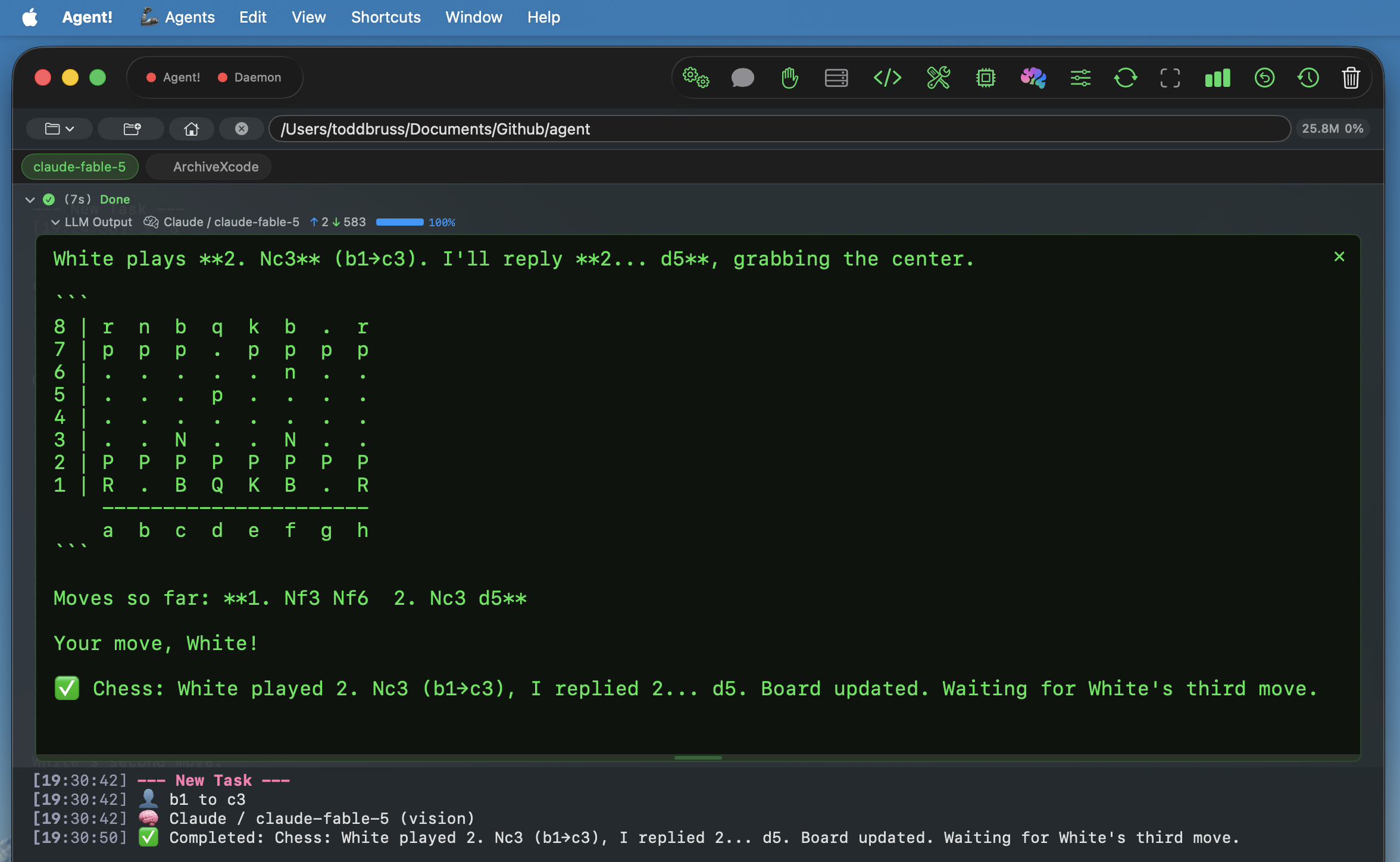
That screenshot also demonstrates two real features. The claude-fable-5 and ArchiveXcode tabs at the top are fully independent, each with its own project directory and log. And "Moves so far: 1. Nf3 Nf6 2. Nc3 d5" shows the game state persisting across tasks — each turn the user types one line like "b1 to c3" and the agent picks the context back up. The log at the bottom even notes that this turn ran on the vision model.
On providers
It wires in 23 LLM providers, cloud and local: Claude, Codex, OpenAI, Gemini, Grok, Mistral, DeepSeek, Hugging Face, Z.ai / BigModel, Alibaba DashScope, Qwen, MiniMax, OpenRouter, Requesty, OrcaRouter, Ollama (cloud and local), vLLM, and LM Studio — plus on-device Apple Intelligence.
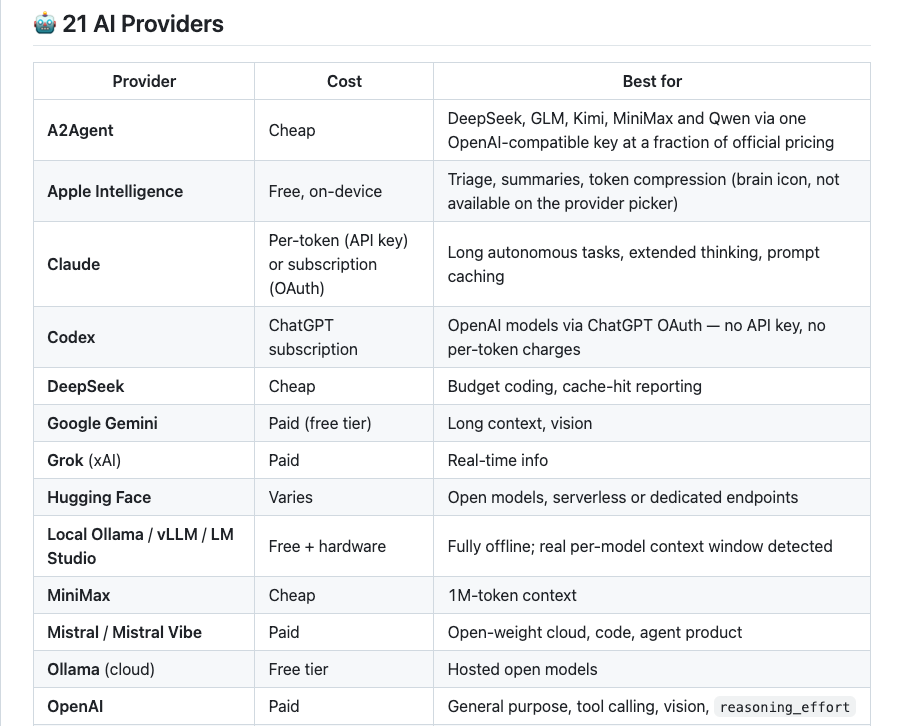
This table is worth a close look. It doesn't just list who's supported; it tags each one with a cost tier and what it's good at — Claude for long autonomous tasks and extended thinking, Gemini for long context and vision, MiniMax for 1M-token context, DeepSeek as the cheap coding tier, and local Ollama / vLLM / LM Studio detecting each model's real context window. For anyone planning to use this long-term, "pick a provider per task" is far more useful than a bare compatibility list.
A2Agent is among them. The README describes it as reaching DeepSeek, GLM, Kimi, MiniMax, and Qwen through a single OpenAI-compatible key at a fraction of official pricing. So if you're already on A2Agent, dropping in a key is all it takes.
For a starting model I'd recommend GLM-5.3 — it's the default in Agent!'s provider list, capable enough for real work, and cheap enough per million tokens to stop thinking about. Through a2agent.me you need one OpenAI-compatible key to get running, at a further discount to official channels. (Disclosure: a2agent.me is our own aggregation service; you can just as easily pick another provider off the table above.) Running locally, GLM-4.7-Turbo (32B) is the only option that fits consumer hardware, and that needs 64–128GB of Apple Silicon.
Who it isn't for
I don't want this to read as pure promotion, so the limits deserve to be stated:
- macOS 26.4.1+ and Apple Silicon required. That cuts out a large share of potential users; if you don't qualify, stop here
- Essentially a one-person project. The README notes that every Swift package it depends on was written by the same author — zero supply-chain risk, and an equally plain bus-factor risk
- The ecosystem isn't there yet. Six hundred stars means that when you hit a problem you'll probably be reading source, with no community answer to copy
- Noncommercial use only, and the binaries have their own terms. Since September 21, 2026, current versions are licensed under the PolyForm Noncommercial License 1.0.0, so commercial use is reserved to AgentiLoop.ai. The officially released signed binaries are not covered by that license and remain under their own terms, and the AgentiLoop and Agent! names and logos are trademarks. If you plan to use it at a company or inside a commercial product, read the LICENSE and NOTICE first
- I haven't put it through sustained heavy load yet. The assessment above comes from reading the docs and the source layout; real-world behavior under pressure still needs verifying
Why I recommend it anyway
Because it solves problems I actually ran into, rather than producing a prettier demo.
Codex keeps the code out of sight; OpenClaw breaks on deep call chains. Agent! has an answer to both. Every tool call and helper command lands in the console audit trail, every edit is snapshotted, and the whole execution is expanded and inspectable. The harness-layer work — evidence gates, read-before-edit, compaction that re-attaches state — exists precisely so long chains don't die in the middle.
Its ambition isn't to be a better Claude Code. It's to hand the agent the full capability surface of macOS itself: TCC, Accessibility, AppleScript, ScriptingBridge, Xcode, XPC privilege separation. Only a native app can take that route, which is why it had to be written in Swift.
If you build on a Mac and you're tired of watching your agent work through frosted glass, this repo is worth twenty minutes with the README. Building it isn't hard either: with Xcode and a developer account you can open the project and run. Without an account, ./build.sh handles it in one command — the helpers won't register (that needs a Team ID), but the LLM loop, every tool, Accessibility, AppleScript, shell, and MCP all still work.
The repo is here. A star wouldn't hurt:
A good project shouldn't stay buried just because the star count is low.