GPT-6.1 Terra vs Kimi K3.1 Pro: Benchmarks, Pricing and Which to Pick
A2Agent Team · 2026-10-28T00:00:00Z
Two notable models shipped in October 2026. On October 26, OpenAI released GPT-6.1 Terra, the efficiency model in the GPT-6.1 family, built for professional work and automation. The same month, Moonshot AI released Kimi K3.1 Pro, a 3T-class open-weight flagship aimed at long coding tasks, 3D work and financial research, with weights due by November 4.
They're built for different jobs. Terra goes after reliable task execution at a low token price. K3.1 Pro goes after flagship-level performance with open weights you can host yourself. This post compares them on architecture, benchmarks, cost and integration, using each company's own launch pages and API docs.
At a glance
| GPT-6.1 Terra | Kimi K3.1 Pro | |
|---|---|---|
| Positioning | Efficient model for professional work and task execution | 3T-class open-weight flagship for long coding and knowledge work |
| Architecture | Not disclosed | 3T-class, open weights, post-trained from Kimi K3 |
| Context window | About 1.05M tokens | 1M tokens (1,048,576) |
| Max output | About 128K tokens | 128K by default, up to 1M |
| Input price (per 1M tokens) | $1.00 | $2.00 |
| Cached input | $0.05 | $0.20 |
| Output | $5.00 | $10.00 |
| Vision | Visual reasoning and computer use | Native image and video understanding |
| Strongest areas | Multi-step task execution, vision with tools | Long coding tasks, 3D work, financial research |
Architecture and context
OpenAI hasn't published Terra's architecture. Its launch materials focus on task results, visual reasoning and computer use, so there's no way to compare parameter counts or expert layouts.
Moonshot describes K3.1 Pro as a 3T-class open-weight model, post-trained from Kimi K3 with much more post-training compute and joint reinforcement learning across hundreds of domains. Full weights are due before November 4, 2026. Once they're out, anyone can inspect the architecture and run the model on their own hardware.
Both models read about a million tokens, with Terra slightly ahead at roughly 1.05M. Terra's output tops out at about 128K tokens, while K3.1 Pro defaults to 128K and can be set as high as 1M, nearly eight times more, which helps with very long documents or generating large parts of a codebase in one pass. A model that accepts a million tokens can still miss details buried in the middle, so test long inputs before relying on them.
Kimi K3.1 Pro benchmarks
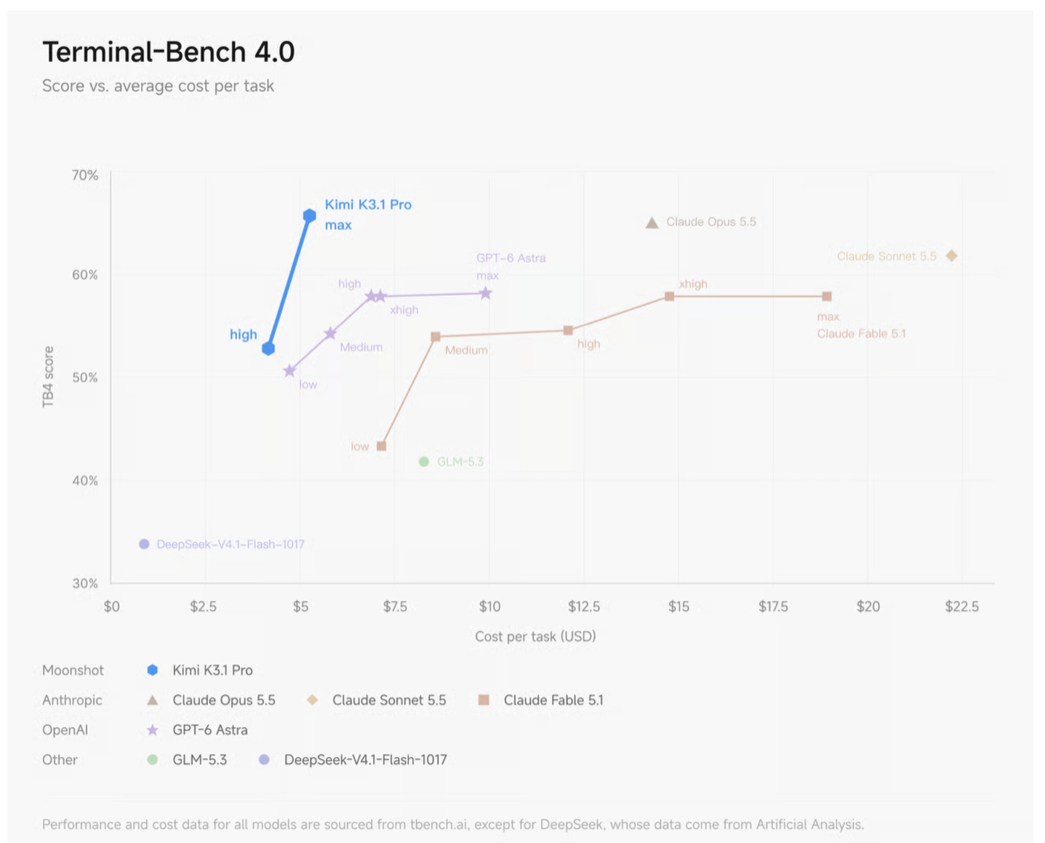
On Terminal-Bench 4.0, which tests real coding tasks in a terminal, K3.1 Pro scores 65.7% at max effort, using the Claude Code harness. That's ahead of GPT-6 Astra (58.2%) and just behind Claude Opus 5.5 (66.4%). It also costs less per task: in Moonshot's chart, K3.1 Pro reaches its top score for about $5 a task, while Opus 5.5 costs around $14 and GPT-6 Astra around $10. On Moonshot's internal Kimi Code Bench 3.0 Long-horizon, it scores 61.2, up from 55.95 for K3.
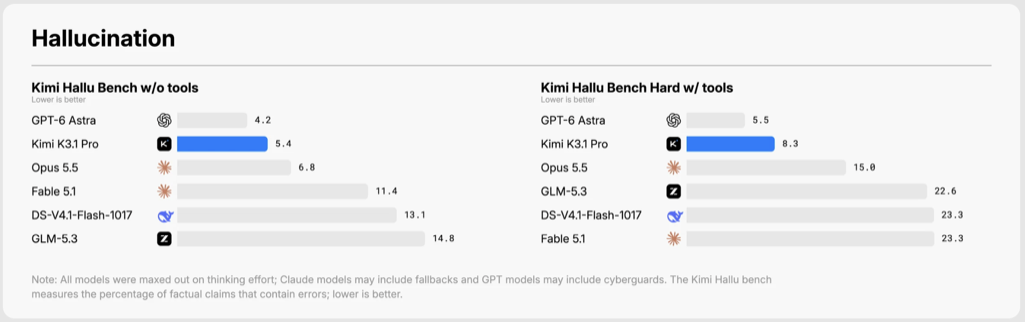
Hallucination dropped sharply. On Kimi Hallu Bench, 5.4% of K3.1 Pro's factual claims contain an error without tools, and 8.3% on the hard set with tools. GPT-6 Astra does slightly better at 4.2% and 5.5%, but K3.1 Pro beats Claude Opus 5.5 (6.8% and 15.0%), Claude Fable 5.1, GLM-5.3 and DeepSeek V4.1 Flash 1017. Its predecessor K3 was at 23.4% on this benchmark.
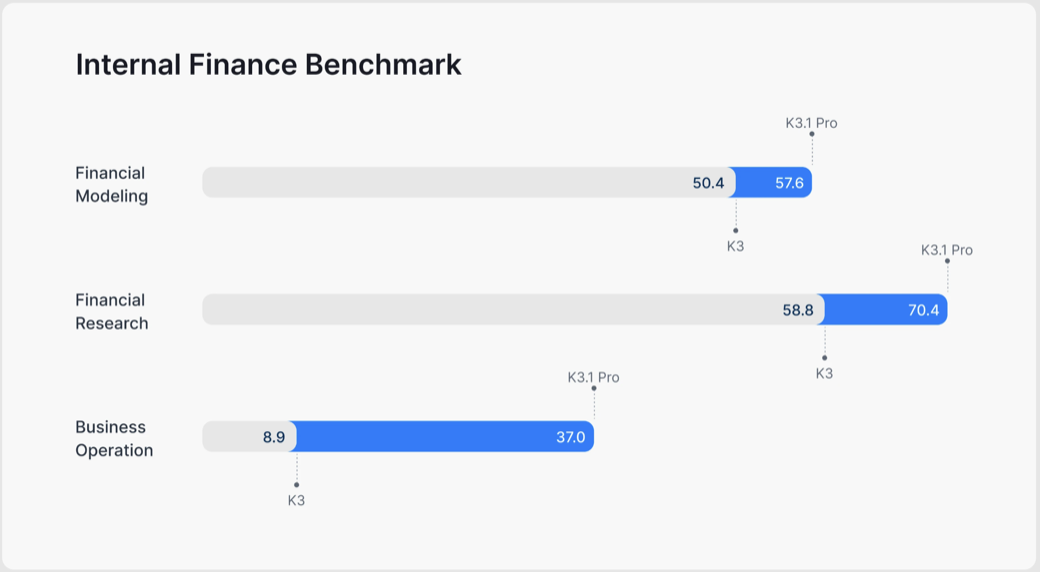
Finance is the other big jump. On Moonshot's internal benchmarks, Financial Modeling went from 50.4 to 57.6, Financial Research from 58.8 to 70.4, and Business Operation from 8.9 to 37.0, about four times higher. K3.1 Pro also scores 64.4 on OfficeQA Pro v2, which Moonshot calls the best result in the industry.
Moonshot also reports 94.2 on GPQA-Diamond, a set of graduate-level science questions where it now beats most human experts, and 51.1 on the full Humanity's Last Exam.
GPT-6.1 Terra benchmarks
OpenAI compares Terra mostly with its predecessor, GPT-5.6 Terra, and the jumps are large.
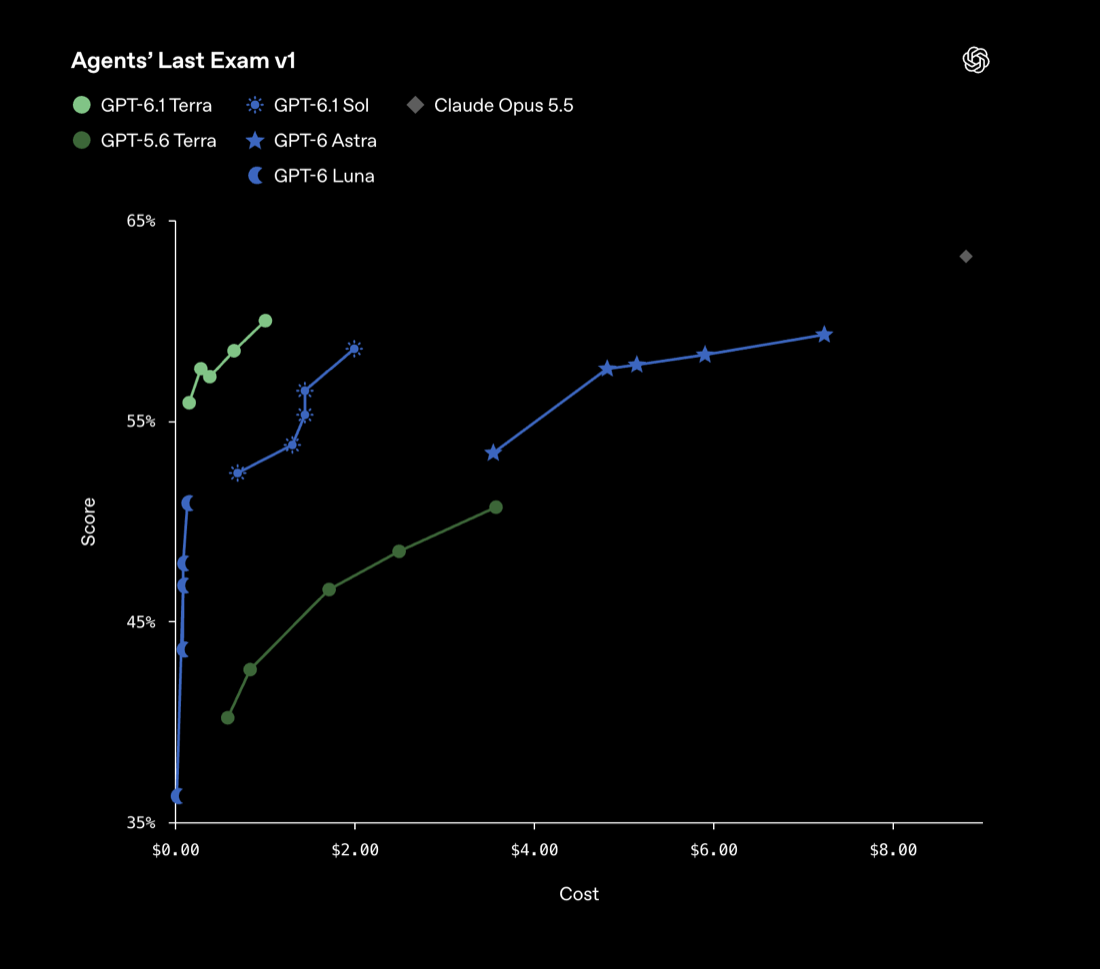
Agents' Last Exam tests professional work and complex workflows. OpenAI's examples include turning architectural drawings into 3D models and reviewing animation footage frame by frame to produce a timestamped fix list. At medium effort, Terra scores 15 points higher than GPT-5.6 Terra at about a third of the cost. In the chart, its best result is around 60% for roughly $1 a task. Claude Opus 5.5 scores a few points higher, at close to $9.
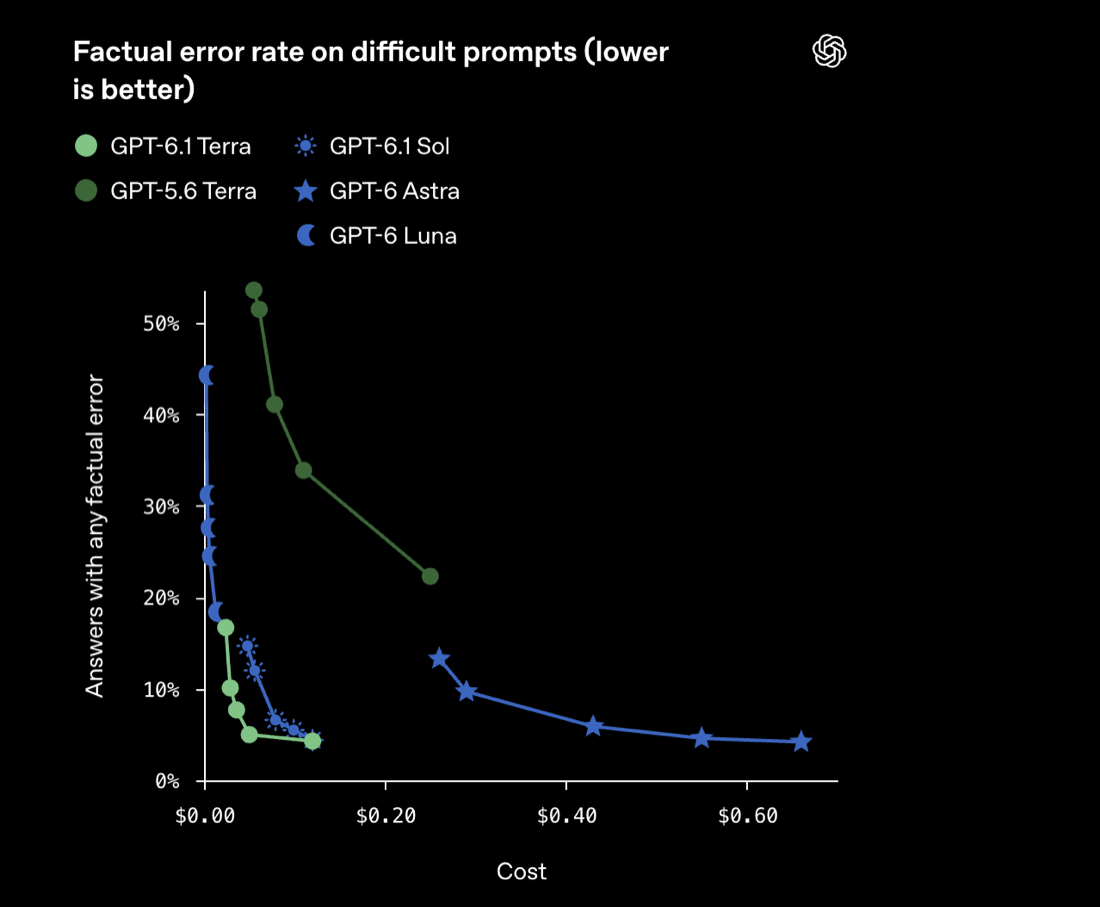
Factual accuracy improved the most. On OpenAI's internal set of difficult prompts, the share of answers with a factual error fell from 53.6% for GPT-5.6 Terra to 16.7% for Terra at low effort, and to 4.3% at the highest setting. For workflows that touch financial or customer data, fewer errors means less human checking.
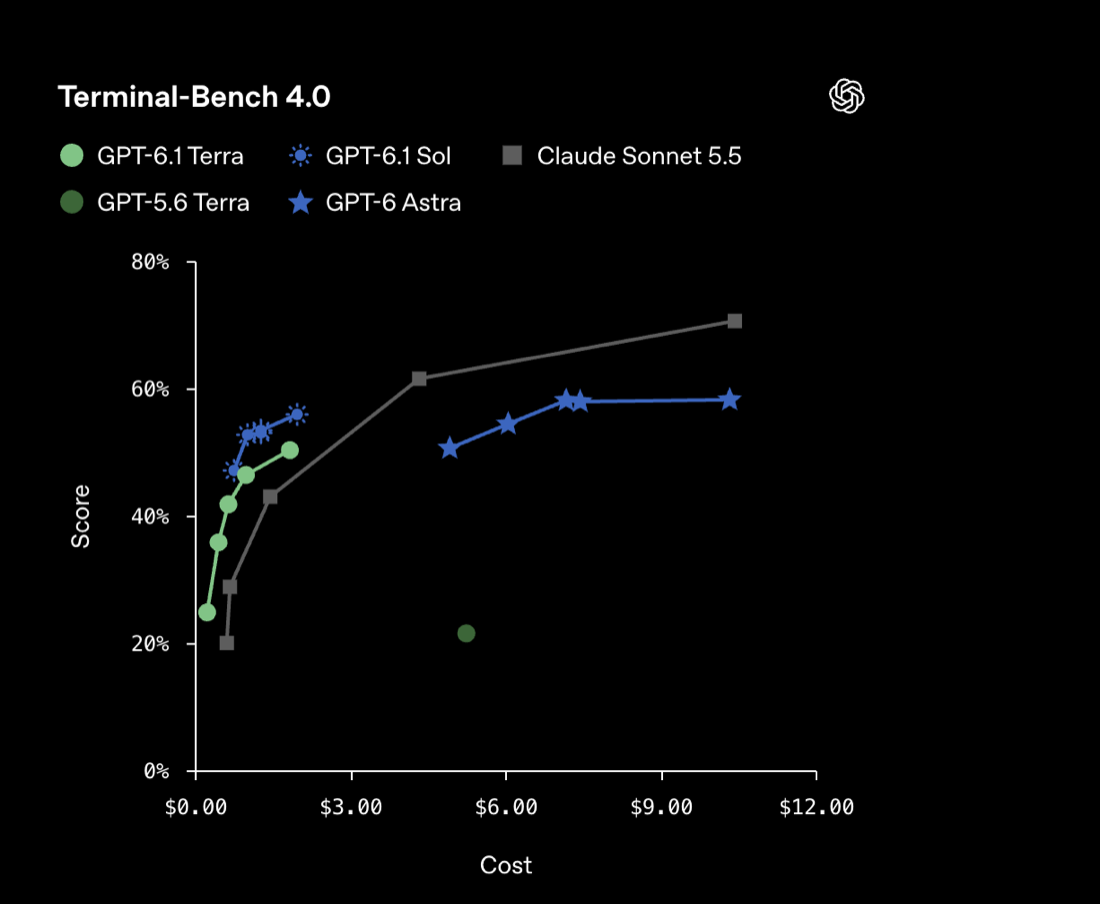
On Terminal-Bench 4.0, Terra scores 50.3% at its highest setting, up from 21.5% for GPT-5.6 Terra, for under $2 a task. OpenAI says GPT-6.1 Sol and GPT-6 Astra remain its picks for the hardest coding work.
Terra also improved on MMMU-Pro, a visual reasoning benchmark, and on OSWorld 2.1, which tests multi-step desktop tasks. OpenAI didn't publish exact scores for either.
Vision and computer use
Visual understanding means reading information out of an image. Computer use goes further: looking at a screen, deciding what to do next, doing it, and checking the result.
Terra is built for both. OpenAI names detailed visual reasoning and precise computer use as its main focus, which fits form filling, operating software and business automation.
K3.1 Pro takes images and video as input. Moonshot reports 84.1 on MMMU-Pro and 79.6 on OSWorld V2.1. Those numbers come from Moonshot's own tests and Terra's come from OpenAI's, under different conditions, so read them as a rough direction. Whether K3.1 Pro can actually drive software also depends on the API features and tools you give it.
Take invoice entry as an example: find the vendor, date and amount, map them to fields in your software, then enter and check them. If you only need the extraction step, run both models on the same set of invoices and compare accuracy and cost. If the model has to operate the software itself, start by testing Terra's success rate and how it recovers from mistakes.
A note on vendor charts
Each company picks its own harness and comparison models, and the results don't always agree. In OpenAI's Terminal-Bench chart, Claude Sonnet 5.5 scores about 71% for around $10 a task. In Moonshot's, it scores about 62% for over $20. Both are labeled Terminal-Bench 4.0. Treat cross-vendor comparisons as rough, and trust tests on your own tasks more than either chart.
Pricing
| Per 1M tokens | GPT-6.1 Terra | Kimi K3.1 Pro | K3.1 Pro vs Terra |
|---|---|---|---|
| Input | $1.00 | $2.00 | 2x |
| Cached input | $0.05 | $0.20 | 4x |
| Output | $5.00 | $10.00 | 2x |
On token price, Terra is cheaper: half the price for input and output, and a quarter for cached input. Kimi also sells a Highspeed version of K3.1 Pro at $4 input and $20 output, which runs two to three times faster.
Token price isn't the whole bill, though. A task also costs retries, tool calls, failed attempts and human review, and a cheap model that needs several tries can end up costing more. Compare models by what it costs to finish a task successfully. K3.1 Pro's open weights also change the math at scale, because you can host it yourself.
Integration
Terra uses OpenAI's API and tool ecosystem. Before you build on it, confirm that the API supports your task and that your app can handle its responses reliably.
K3.1 Pro supports tool calls, strict JSON mode, streaming, automatic context caching (5-minute or 1-hour TTL), the Batch API, and compatibility with the OpenAI Responses API and Anthropic Messages API. That compatibility has limits. K3.1 Pro always thinks before answering and fixes parameters such as temperature, so switching to it takes more than changing the model name.
Before going to production with either, test at least plain text requests, JSON output, tool calls, long context, timeouts and rate limits, and any fixed output format your app depends on.
How to choose
A five-step way to decide on evidence instead of spec sheets:
- Collect real examples from your app, including common cases and hard edge cases.
- Define success: the task done correctly, instructions followed, output in the right format, missing information handled sensibly.
- Record tokens, response time and retries, and work out the total cost of each successful task.
- Test failure cases: vague instructions, broken documents, unexpected interface changes, incomplete data.
- Run every candidate on the same test set and pick the best mix of reliability and cost.
Start with GPT-6.1 Terra if your app mostly executes tasks:
- multi-step professional work such as reading documents, filling forms and operating software
- automation that depends on screens and visual judgment
- work where mistakes are expensive, so a model that gets it right the first time can cost less overall
Start with Kimi K3.1 Pro if your app mostly needs raw capability:
- long coding tasks, where its 65.7% on Terminal-Bench 4.0 is close to the top closed models
- 3D modeling, financial research and long document analysis
- self-hosting or keeping data private, once the weights are released before November 4
Whichever you start with, run both on your own tasks and compare success rate, latency and total cost before committing.
Kimi on A2Agent
A2Agent carries the Kimi model family, including Kimi K3, alongside DeepSeek, Qwen, GLM and MiniMax, all through one API key. See the Models page for current availability and prices.
Sources
- Introducing GPT-6.1 Terra (OpenAI)
- GPT-6.1 Terra model docs (OpenAI)
- Introducing Kimi K3.1 Pro (Moonshot AI)
- Kimi K3.1 Pro quickstart (Kimi API docs)
- Kimi model pricing (Kimi API docs)